A canonical tag generator writes one line of HTML that tells Google which version of a page is the "real" one when the same content lives at several URLs. You can use a generator, write the tag by hand in under a minute, or rely on your CMS, which in most cases already outputs it. What matters more than the tool is understanding why duplicate URLs happen and which canonical signal Google trusts most.
This guide covers the duplicate URLs almost every site has, Google's documented methods and their strength, the exact tag to write, common mistakes, how to check it in Search Console, and the types of sitemaps that support it.
What is URL canonicalization?
URL canonicalization is picking one representative URL for content that can be reached at more than one address. Google calls this canonicalization or deduplication, and uses it so only one version of a page shows in search results.
Duplicate URLs are rarely the result of copying content. They are a side effect of how servers, CMSs, ad platforms and filters build links. To a person they look like the same page. To a crawler, each is a separate URL to fetch, compare and group.
The duplicate URLs most sites already have
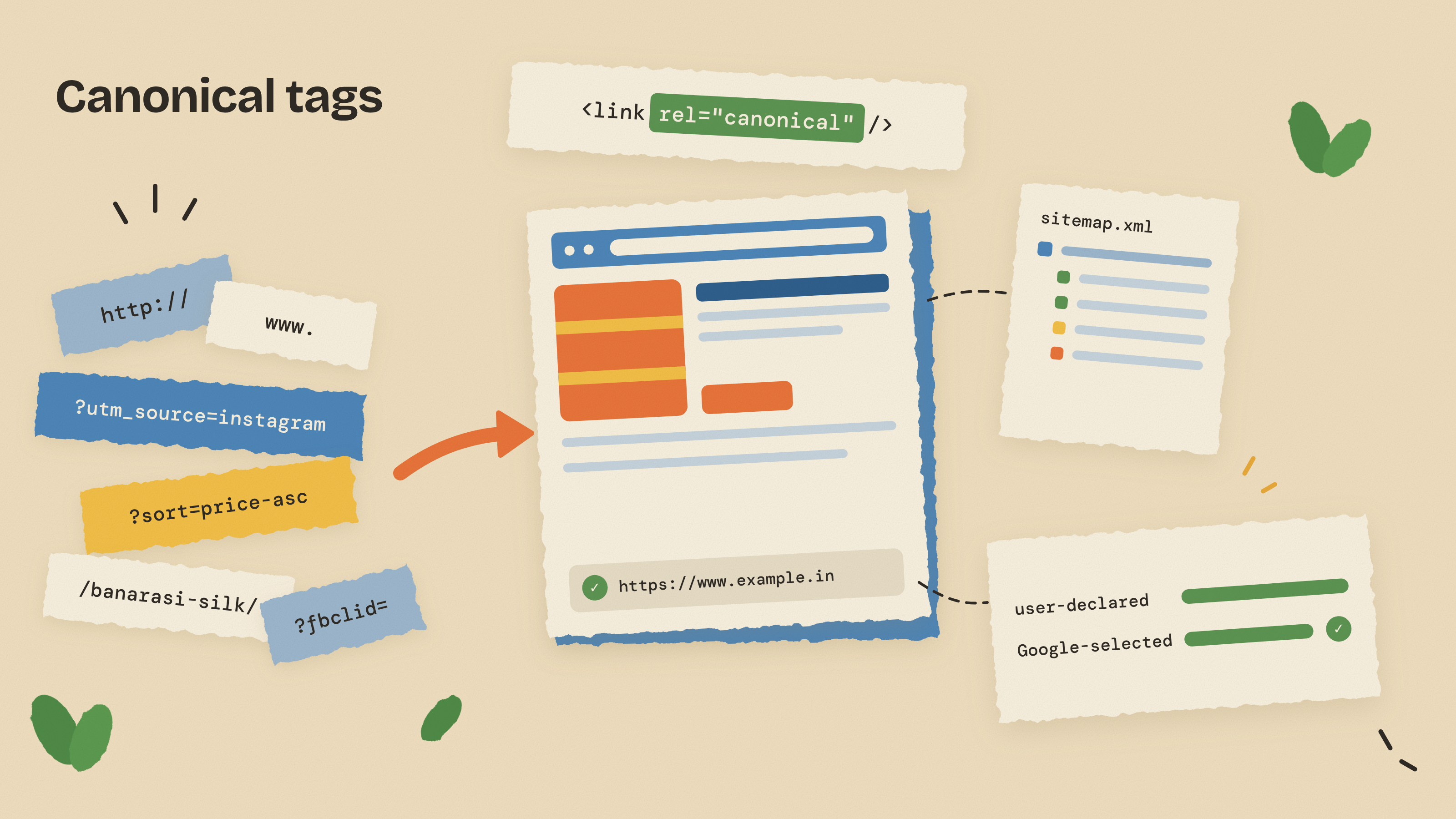
Take a saree store in Nagpur selling a Banarasi silk saree. The same product page could be reachable at all of these:
- Protocol variants: http://example.in/sarees/banarasi-silk and https://example.in/sarees/banarasi-silk
- Hostname variants: example.in versus www.example.in
- Trailing slashes: /sarees/banarasi-silk versus /sarees/banarasi-silk/
- Tracking parameters: ?utm_source=instagram, ?fbclid=..., ?gclid=... added by Meta and Google Ads
- Sorting and filter URLs: /sarees?sort=price-asc, /sarees?colour=red&fabric=silk
- Path variants: /collections/sarees/products/banarasi-silk and /products/banarasi-silk on a Shopify store
- Device and region variants: a separate m. mobile site, or near-identical pages for India and the UAE
- Accidental variants: a staging copy that crawlers can reach
Google's own list of causes covers the same ground and notes that some duplication is normal and not a spam violation. The problem is not a penalty. It is that your links, data and crawl attention get split across addresses you never meant to publish. If your URL structure itself is messy, our guide on URL slugs and absolute vs relative links explains how to design clean paths that need fewer canonicals.
How Google chooses the canonical URL
Google groups pages with the same or very similar main content, then picks the one it considers most complete and useful for searchers. It weighs signals such as HTTPS, redirects, sitemap inclusion and any rel="canonical" annotation you have added.
The key line in Google's documentation is that a canonical preference is a hint, not a rule. If your tag says one thing while your internal links, sitemap and redirects say another, Google may ignore it and choose its own canonical. Sending a clear signal pays off in four ways, per Google:
- You control the URL people see in results, not one with a tracking parameter.
- Link signals consolidate on one URL instead of spreading across duplicates.
- Reporting gets simpler because one page's traffic is not split across five addresses.
- Crawling is more efficient, with less time on duplicates and more on new pages.
How to set a canonical: Google's methods and their strength
Google's guide to consolidating duplicate URLs lists the supported methods from strongest to weakest. Combining them increases the chance your preferred URL is chosen, as long as they all point to the same place.
| Method | Strength (per Google) | Best for | Watch out for |
|---|---|---|---|
| Permanent redirect (301/308) | Strong | Retiring a duplicate: HTTP to HTTPS, non-www to www, old URLs after a redesign | The old URL stops working, so do not redirect filter pages people use |
| rel="canonical" link element | Strong | Duplicates that must stay live: tracking parameters, sort and filter URLs | Only read inside a valid head section |
| rel="canonical" HTTP header | Strong | Non-HTML files such as PDFs | Needs server or CDN setup; do not also add a conflicting HTML tag |
| Sitemap inclusion | Weak | Supporting the other signals site-wide | List only canonical URLs, never duplicates |
In practice, site-wide duplicates such as HTTP and non-www variants get redirects at the server level. Duplicates that need to keep working, such as a filtered category or a UTM-tagged link, get a canonical tag. The sitemap lists only canonical URLs, reinforcing both.
What Google says not to do
- Do not use robots.txt. A blocked duplicate cannot be read, so Google never sees its canonical, and the URL may still be indexed without content.
- Do not use noindex to steer which page becomes canonical within one site.
- Do not use the URL removal tool. It hides every version of the URL.
- Do not send mixed signals, such as one canonical in the sitemap and another in the tag.
How to write the canonical tag yourself
You do not need any tool. It is a single link element inside the head section of the duplicate page. For the saree example, every variant would carry this line:
<link rel="canonical" href="https://www.example.in/sarees/banarasi-silk" />
That is the whole thing. A few rules from Google turn it into a reliable signal:
- Use an absolute URL with https:// and the full domain. Relative paths work but are not recommended.
- Place it in the head. A tag in the body is ignored.
- Add a self-referencing canonical on the main page, so it stays protected when someone links to it with parameters.
- Use one tag per page. Two different tags, often one from the theme and one from a plugin, cancel each other out.
- Pick the HTML tag or the HTTP header, not both.
- Link internally to the canonical URL, with the same trailing slash rule everywhere.
For a PDF such as a price list, there is no head section, so you send the canonical as an HTTP response header instead:
Link: <https://www.example.in/downloads/price-list.pdf>; rel="canonical"
On sites rendered with JavaScript, put the canonical in the HTML the server sends. Google advises against letting JavaScript change it after load.
What a canonical tag generator does (and when you need one)
A canonical tag generator is a small web tool. You paste a URL and it returns the link element above, ready to copy. Better ones clean the URL first: force HTTPS, strip UTM and click-ID parameters, remove fragments and apply a consistent trailing slash. Some handle URLs in bulk.
That helps if you hand-code static pages or use a landing page builder with no canonical field. For most business websites, though, the generator solves a problem your platform has already solved.
WordPress
WordPress core has printed a canonical tag on single posts and pages since version 2.9, through the rel_canonical() function. It does not cover category, tag or search archives. SEO plugins such as Yoast SEO and Rank Math replace it, extend it to archives, and add a per-page canonical field in advanced settings.
Shopify
Shopify has a global Liquid object called canonical_url that returns the canonical URL for the current page, and standard themes use it to print the tag. This matters because products are often reachable through a collection path as well as the plain /products/ path. After customising a theme, check the tag is still there. Our guide to ecommerce SEO for Shopify and WooCommerce covers other store duplicate traps, such as variant URLs and filtered collections.
Custom-built sites
On Next.js, Laravel or a static generator, the template should build the canonical from a site URL setting plus the clean path, ignoring the query string. In our website development work, this is part of the SEO-ready baseline along with the sitemap and redirects.
So use a canonical tag generator for one-off static pages or to double-check a URL. On WordPress or Shopify, view your page source first. The tag is probably already there, and adding a second one by hand is a common way to break it.
Common canonical tag mistakes that quietly break SEO
Canonical errors rarely show visible errors. Pages just drop out of results or the wrong URL ranks. The ones we see most in audits:
- Canonical pointing to a 404. After a redesign, old values linger in templates or plugin fields. A page that returns an error is a poor candidate, so Google is likely to ignore your hint and pick its own version.
- Canonical chains. Page A points to B, which points to C, or the target redirects. Always point straight at the final, live, 200-status URL.
- Mixing noindex with canonical. "Do not index me" plus "my real version is page X" is contradictory. Google recommends canonical, not noindex, for duplicates within a site.
- Every page canonicalised to the home page. Usually a theme or plugin bug, and inner pages can vanish from results.
- Paginated pages pointing to page 1. Page 2 lists different products, so it should normally carry a self-referencing canonical.
- Canonical target blocked in robots.txt, so Google cannot crawl it to confirm it.
If pages are missing from Google entirely, canonicals are only one possible cause. Our list of reasons a site is not showing on Google covers the others.
How to check canonicals in Search Console URL Inspection
Your page source shows what you declared. Only Google can show what it chose. The URL Inspection tool in Search Console shows both:
- Paste the full URL into the inspection bar at the top of Search Console.
- Expand the page indexing section.
- Read User-declared canonical: the canonical you set through a tag, header or sitemap. "None" is fine for a page with no alternate versions.
- Read Google-selected canonical: the URL Google picked after comparing similar pages.
- If they differ, check whether your internal links, sitemap or redirects favour the other version.
- After fixing, click Request indexing. Google says to expect a day or more, with no guarantee.
At scale, the Page indexing report groups URLs under reasons such as "Duplicate, Google chose different canonical than user". "Alternate page with proper canonical tag" is usually good news: Google respected your canonical.
Types of sitemaps and how they support canonicals
A sitemap is the weakest canonical signal, but it covers your whole site at once. Google's sitemap overview describes it as a file listing your pages, videos and other files, and notes that many CMSs already generate one. The main types of sitemaps:
| Type | What it lists | Who needs it | Key rules |
|---|---|---|---|
| XML sitemap | Canonical page URLs, optionally with last-modified dates | Almost every site | Up to 50,000 URLs or 50MB uncompressed per file |
| Image (extension) | Image locations on each page | Stores, portfolios, real estate, food brands | Image entries inside the XML sitemap |
| Video (extension) | Video details such as running time and rating | Sites hosting their own videos or courses | Video entries inside the XML sitemap |
| News (extension) | Recent articles with title and publication date | Publishers eligible for Google News | Last two days only; up to 1,000 news entries |
| RSS, Atom or text | A feed, or a plain list of URLs | Blogs or very simple sites | Same size limits |
| HTML sitemap | A web page linking to main sections | Visitors and deep sites | For people; not submitted to Search Console |
Google's guide to building a sitemap says it supports XML, RSS, mRSS, Atom 1.0 and text with no preference, wants absolute URLs, ignores priority and changefreq, and uses lastmod only when it is accurate. The news sitemap rules are stricter still, which is why most small businesses never need one.
For canonicalization, list only the canonical version of each URL. A sitemap entry with a trailing slash while the tag has none is exactly the mixed signal Google warns about. Google adds that well-linked sites of about 500 pages or fewer may not need a sitemap, though most sites benefit. For getting found beyond your sitemap, see our guide to search engine listing on Google, Bing and Indian directories.
A 15-minute canonical audit checklist
- Type the http:// and non-www versions of your domain. Each should 301 redirect to your single HTTPS version.
- View source on a key page and search for "canonical". Expect exactly one absolute HTTPS URL.
- Confirm that URL returns 200 and does not redirect.
- Add ?utm_source=test to a URL. The canonical should still be the clean URL.
- Open your XML sitemap and confirm it lists only canonical URLs.
- Compare user-declared and Google-selected canonicals for two or three key URLs.
Canonicals are one part of technical on-page work. Our on-page vs off-page SEO checklist shows where they fit. Our Shopify builds ship with canonicals, redirects and sitemaps checked before launch.
Get your canonicals checked
If you would rather not dig through page source yourself, start with the free AI and SEO audit on our SEO services page, which flags duplicate URLs, canonical conflicts and sitemap gaps. Ongoing SEO support from Timewheel starts at ₹15,000 a month, and every starting price is on our pricing page.
Frequently asked questions
What is URL canonicalization?
URL canonicalization is choosing one representative URL for content that can be reached at several addresses, such as HTTP and HTTPS, www and non-www, or URLs with tracking parameters. Google groups the duplicates and shows one version in search results. You influence which one with redirects, canonical tags and your sitemap.
Do I need a canonical tag generator for WordPress or Shopify?
Usually not. WordPress core adds a canonical tag to single posts and pages, and SEO plugins like Yoast and Rank Math extend it. Shopify themes print one using the canonical_url Liquid object. Check your page source before adding anything, because a second tag can conflict with the first.
Should every page have a self-referencing canonical tag?
Yes, Google recommends adding a canonical to the canonical page itself. It protects the page when other sites or ads link to it with parameters attached. Pages with no duplicates still benefit because the signal is clear and consistent.
Can I use noindex instead of a canonical tag?
Google does not recommend using noindex to pick a canonical within the same site. Noindex removes the page from results without consolidating signals onto your preferred URL. Use rel="canonical" for duplicates and keep noindex for pages you genuinely want out of search.
What are the types of sitemaps?
The main types of sitemaps are XML sitemaps, image, video and news extensions to XML, RSS, Atom or text feeds, and HTML sitemaps for visitors. Google supports XML, RSS, mRSS, Atom 1.0 and text formats with no preference. Each sitemap file can hold up to 50,000 URLs or 50MB uncompressed.
Why did Google choose a different canonical than mine?
A canonical tag is a hint, not a rule, so Google weighs it against other signals. The usual causes are internal links or the sitemap pointing to another version, a canonical target that redirects or errors, or pages that are not truly duplicates. Fix the conflicting signals, then inspect the URL again in Search Console.
Shubham N Datarkar
Founder, Timewheel
Shubham founds and leads Timewheel, a Nagpur product studio that builds its own software and runs SEO, AI-search and growth for businesses across India. He writes from hands-on work shipping products and measuring what actually moves rankings and revenue.
Comments
Be the first to comment.