If you are wondering which heading element gives the most prominent heading, the answer is <h1>. HTML has six heading levels, and MDN's reference for the heading elements states that h1 is the highest section level and h6 the lowest. Browsers also show h1 in the largest default font, so it is both the most important and the most visible heading on the page.
The more useful question for a business owner is what headings and breadcrumbs do for your site. Both are small, cheap fixes that help visitors, screen reader users and Google understand how your pages are organised.
Which heading element gives the most prominent heading, and why it matters
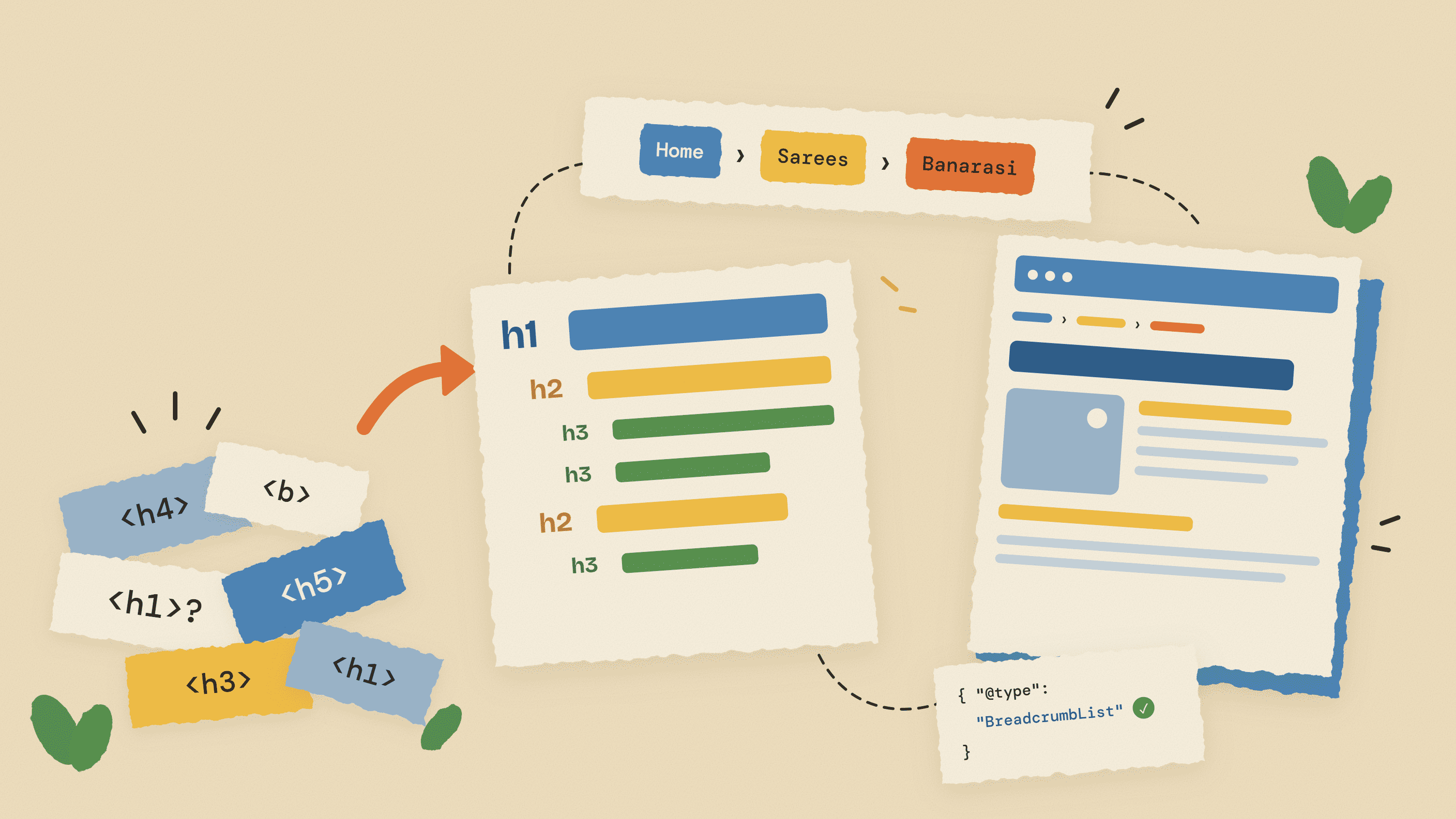
Think of the six heading tags as a document outline: the h1 is the page title, h2 tags are chapters, h3 tags are sections inside a chapter. The W3C Web Accessibility Initiative headings tutorial puts it the same way: rank 1 is the most important heading and rank 6 the least important.
Two points trip people up:
- Prominence is about rank, not size. CSS can make an h1 tiny and an h3 huge; the h1 still ranks highest. MDN says not to use heading elements to resize text and to use the CSS
font-sizeproperty instead. - Bold text is not a heading. Big bold paragraph text looks like a heading, but browsers, screen readers and search engines see an ordinary paragraph.
Here is the basic shape of a well structured service page, shown as code:
<h1>Website Development in Nagpur</h1><h2>What we build</h2><h3>Business websites</h3><h3>Ecommerce stores</h3><h2>Pricing</h2><h2>How the project works</h2>
Read only the headings and you already know what the page offers. That is the test every page on your site should pass.
Heading hierarchy for SEO and accessibility
One h1 per page is the convention
The HTML standard technically allows more than one h1 on a page. MDN notes this, but also says it is not considered best practice and that a page should generally have a single h1 that describes its content, much like the page's <title>. On a blog post the h1 is the post title; on a product page it is the product name; on your home page it is usually your business name plus what you do.
Nest h2 and h3 logically, without skipping levels
After the h1, use h2 for each main section and h3 for subsections inside an h2. MDN advises against skipping levels, for example jumping from h1 straight to h3, and the W3C tutorial says skipping ranks can be confusing and should be avoided where possible. Going back up is fine: after an h4 you can start a new section with an h2.
Why screen reader users depend on headings
According to MDN, a common technique for screen reader users is to jump from heading to heading to understand what a page contains, and most screen readers can generate a list of all headings on a page. If your headings are missing, out of order or replaced by bold text, that shortcut breaks.
What Google says about headings
Google is relaxed about the technical details. Its SEO Starter Guide recommends headings to help users navigate your pages, says that from a Google Search perspective it does not matter if you use them out of order, and notes there is no magical, ideal number of headings per page. So do not expect a ranking jump from fixing heading order alone.
What headings do is make content clear, which helps readers and makes your answers easier to lift into AI summaries (see our guide to answer engine optimisation). They are one line item in a wider on-page SEO checklist, not a magic switch.
Common heading mistakes we see on small business sites
Most heading problems come from themes, page builders and copy-pasted templates, not the content team.
| Mistake | Why it hurts | Fix |
|---|---|---|
| No h1 at all, or the h1 is an image banner with text baked in | The page has no clear main heading for screen readers or search engines | Add a real text h1 that names the page topic; keep the banner as a background |
| Logo wrapped in h1 on every page | Every page shares the same main heading, so the real page title is demoted | Change the logo to a plain link in the theme header template |
| Headings used for styling ("make this text bigger") | Random h4 or h5 tags appear in footers, sidebars and testimonials and break the outline | Use CSS classes for size, keep heading tags for section titles |
| Skipping from h1 to h4 | Screen reader users wonder what they missed; the outline looks broken | Step down one level at a time: h1, h2, h3 |
| Bold paragraphs instead of headings | Sections are invisible to heading navigation | Convert section titles to h2 or h3 in the editor |
| Vague or keyword-stuffed headings | "Our Services" says nothing; stuffed headings read as spam | Write descriptive headings that use the main phrase once, naturally |
A quick way to audit a page: open it in Chrome, right click, choose View Page Source and search for <h1, then <h2. Headings in odd places, such as a cookie banner or footer widget, are a template fix for your developer.
What is breadcrumb navigation?
Breadcrumb navigation is the short trail of links, usually near the top of a page, that shows where the current page sits in your site. A typical example on an Indian ecommerce store looks like this:
Home › Women › Sarees › Banarasi Silk Saree
Each item except the last is a link, so a shopper who lands on one saree from Google can tap "Sarees" and browse the category in one step. Google's own breadcrumb structured data documentation describes a breadcrumb trail as showing the page's position in the site hierarchy.
The three types of breadcrumbs
- Location (hierarchy) breadcrumbs. Show where the page sits in your site structure: Home › Services › Website Development. This is the type most sites should use, and it is the type Google's markup is built around.
- Attribute breadcrumbs. Show the filters or attributes a shopper has chosen: Home › Sarees › Silk › Red › Under ₹5,000. They are common on large catalogues with filtering. Use them carefully, because every filter combination can create a new URL.
- Path (history) breadcrumbs. Show the pages a visitor clicked through in this session. They duplicate the back button and describe no site structure, so most sites should skip them.
Why breadcrumbs help visitors
Breadcrumbs matter most on sites with depth: online stores, coaching institutes with many courses, real estate portals and blogs with categories. Visitors often land on a deep page from search, and the trail tells them where they are and offers a one-tap route to related pages, handy on mobile where the menu hides behind a hamburger icon. On a five-page brochure site, breadcrumbs add little.
What is breadcrumbs in SEO? BreadcrumbList structured data explained
In SEO, breadcrumbs do two jobs. The visible trail adds internal links from deep pages up to parent pages. Separately, breadcrumb structured data tells Google exactly how the page fits into your site hierarchy, using the schema.org type BreadcrumbList.
Google's starter guide notes that Google learns breadcrumbs automatically from the words in your URL, and that you can also influence them with structured data. If your URLs are messy, such as /index.php?p=4821, markup is your way of giving Google a readable path. Clean URLs help too; see our explainer on URL slugs.
The required properties
According to Google's breadcrumb documentation, a BreadcrumbList needs at least two ListItem entries, in order, and each ListItem uses three properties:
- position: a number, where 1 is the start of the trail.
- name: the label shown to users, for example "Sarees".
- item: the URL of that breadcrumb page. For the last item (the current page) it is optional, and Google uses the URL of the page itself.
Google also advises that breadcrumbs should reflect a typical user path to the page rather than simply mirror the URL structure. If a product can be reached through two categories, the documentation says you can specify more than one breadcrumb trail.
A JSON-LD example you can adapt
JSON-LD sits in a script block and does not change what visitors see. Here is a trail for a saree page on a fictional store:
<script type="application/ld+json">{ "@context": "https://schema.org", "@type": "BreadcrumbList", "itemListElement": [ { "@type": "ListItem", "position": 1, "name": "Women", "item": "https://example.in/women" }, { "@type": "ListItem", "position": 2, "name": "Sarees", "item": "https://example.in/women/sarees" }, { "@type": "ListItem", "position": 3, "name": "Banarasi Silk Saree" } ]}</script>
The home page is not listed and the last item has no URL: Google's documentation says neither is required. Keep the markup consistent with the trail visitors actually see.
The visible trail: HTML and accessibility
Shopify's guide to building an accessible breadcrumb navigation recommends a labelled nav element, an ordered list, aria-current on the current page, and separators like "›" added with CSS so screen readers skip them:
<nav aria-label="breadcrumb"> <ol> <li><a href="/">Home</a></li> <li><a href="/women/sarees">Sarees</a></li> <li><a href="/women/sarees/banarasi" aria-current="page">Banarasi Silk Saree</a></li> </ol></nav>
How to test it
Google's documentation suggests the Rich Results Test before launch, then the URL Inspection tool and the breadcrumb report in Search Console. New to Search Console? Our guide on why a site is not showing on Google walks through the setup.
Does Google show breadcrumbs in mobile search results?
No, not any more. On 23 January 2025, Google announced in a Search Central post on simplifying the visible URL element on mobile search results that it would stop showing breadcrumbs in mobile results in all languages and regions. Mobile results now show only the domain, because breadcrumbs were often cut off on small screens.
Desktop results are unchanged: they still show the domain and the breadcrumb path. Google's breadcrumb documentation currently describes the feature as available on desktop. The same post says site owners do not need to do anything, breadcrumb markup is still supported, and the breadcrumb rich result report in Search Console continues.
So do not add breadcrumb markup expecting a prettier mobile listing. Add it because it describes your structure clearly, still shapes your desktop listing and costs little once built into templates. The visible trail on your own pages still helps mobile visitors.
Adding breadcrumbs and fixing headings in WordPress and Shopify
WordPress
Most WordPress sites in India run an SEO plugin already, and the popular ones handle breadcrumbs. With Yoast SEO, the Yoast breadcrumbs help page explains the steps:
- Go to Yoast SEO, then Settings, then Advanced, then Breadcrumbs, and switch the feature on. It is off by default.
- Place the trail on the page using the Yoast Breadcrumbs block in the block editor, the
[wpseo_breadcrumb]shortcode, or a short PHP snippet in your theme files (for example above the title insingle.php). - Once configured, Yoast outputs
BreadcrumbListJSON-LD in the page source automatically, so you do not need to hand-write the markup.
Theme file edits can be wiped by updates, so use a child theme. Many themes ship their own breadcrumbs too, so check you do not end up with two trails or two sets of markup. For headings, check the header template for a logo h1 and make sure the post title is the only h1.
Shopify
Many Shopify themes include a breadcrumb option in the theme editor, so check Online Store, Themes, Customize first. If yours does not, Shopify's partner guide linked above shows the developer route: create a breadcrumbs.liquid snippet, include it in theme.liquid just above the main content, and use the template type to build the right trail for products, collections, blog posts and pages, while hiding it on the home page and cart.
On product pages, the product title should be the h1 and blocks such as "Reviews" should be h2; custom sections added by apps often hard-code the wrong level. For more store-specific fixes, see our ecommerce SEO strategies guide, or have a Shopify developer set it up once in the theme.
Custom-coded sites
On a custom build, generate both the visible trail and the JSON-LD from page data in a shared layout component, so every new page gets correct breadcrumbs automatically. This is part of the SEO-ready setup we include when we handle website development projects.
Breadcrumbs and heading tags checklist
Run through this list for your home page, one service or category page, one product or course page, and one blog post. If those templates pass, most of your site will.
| Check | Pass looks like |
|---|---|
| One h1 per page | A single text h1 that names the page topic, not the logo |
| Logical nesting | h2 for main sections, h3 inside them, no jumps from h1 to h4 |
| No styling headings | Footers, sidebars and testimonials use classes, not stray h4 or h5 tags |
| Descriptive headings | Each heading says what the section covers |
| Breadcrumbs where depth exists | Trail on product, category, course and blog pages; skipped on a tiny brochure site |
| Accessible markup | nav with aria-label, ordered list, aria-current on the current page, CSS separators |
| BreadcrumbList JSON-LD | At least two items, correct positions, matches the visible trail, only one set per page |
| Tested | Passes the Rich Results Test; no errors in the Search Console breadcrumb report |
If you use attribute breadcrumbs on filtered category pages, pair them with canonical tags so filter URLs do not compete with the main category.
Get the structure right once, in the template
Neither headings nor breadcrumbs will rank a weak page on their own, but they make every page easier to scan and understand, and because they live in templates, fixing them once fixes the whole site. If you would like this built in from the start, our web development team in Nagpur sets up heading structure and breadcrumb markup on every build, and our SEO service includes a free AI and SEO audit that flags these issues on an existing site. Starting prices for both are on the pricing page.
Frequently asked questions
Which heading element gives the most prominent heading in HTML?
The h1 element. HTML has six heading levels from h1 to h6, and h1 is the highest rank and, by default, the largest. Its importance comes from its rank in the page structure, so it stays the top heading even if CSS changes its size.
Can a page have more than one h1 tag?
The HTML standard allows it as long as the h1 elements are not nested, but MDN says it is not considered best practice. A single h1 that describes the page, similar to the title tag, is the clearer and safer convention for visitors and assistive technology.
What is breadcrumb navigation?
Breadcrumb navigation is a short trail of links, such as Home, Sarees, Banarasi Silk Saree, that shows where the current page sits in a website. It lets visitors jump back to parent pages in one tap. The three common types are location, attribute and path breadcrumbs.
What is breadcrumbs in SEO?
In SEO, breadcrumbs add internal links from deep pages to their parent pages and, through BreadcrumbList structured data, tell Google how a page fits into your site hierarchy. Google can use this to display the breadcrumb path in desktop search results.
Does Google still show breadcrumbs in mobile search results?
No. Google announced on 23 January 2025 that mobile results would show only the domain, not breadcrumbs, in all languages and regions. Desktop results still show breadcrumbs, the markup is still supported, and site owners do not need to change anything.
Do heading tags directly improve Google rankings?
Not on their own. Google's SEO Starter Guide says headings help users navigate, that using them out of order does not matter for Google Search, and that there is no ideal number of headings. Good headings help by making content clearer and easier to scan.
Shubham N Datarkar
Founder, Timewheel
Shubham founds and leads Timewheel, a Nagpur product studio that builds its own software and runs SEO, AI-search and growth for businesses across India. He writes from hands-on work shipping products and measuring what actually moves rankings and revenue.
Comments
Be the first to comment.